Description
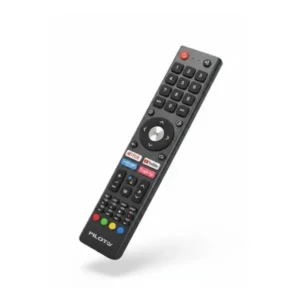
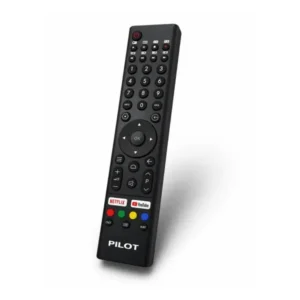
Original remote control for PILOT P50UAC TV
Original remote control GCBLTV10A-C15 is designed for PILOT smart TVs with Android TV system.
It replaces a lost, broken, or unresponsive remote control, restoring full control over all TV functions.
Includes Netflix, YouTube, and Android TV navigation buttons.
Has your remote stopped responding?
Before bringing in a technician, check the batteries.
If you have replaced the batteries and there is still no response, it may be a faulty remote control.
A non-original remote control may only work partially.
Unique buttons like Netflix, YouTube, and the EPG key require precise matching to the Pilot Android TV protocol. Only an original remote control guarantees full functionality of all buttons.
Just before ordering:
To ensure a successful repair and maintain Television integrityIt is important to use only original parts.
Non-original parts may not function properly and may damage theTV performance Over time.
Now click the 'Check Model Compatibility' button at the top of the page. And the system will immediately confirm that the sign is suitable for you.
Why is an original remote essential for a Pilot Android TV?
From our experience at official service labs, non-original remotes are the number one cause of malfunctions due to incompatibility.
PILOT TVs with Android TV use a unique IR protocol adapted to the operating system version.
A non-original remote may operate basics like volume and channel switching, but will omit essential buttons like Google Assistant, opening apps, and the settings menu.
Customers who purchased this remote favorably noted the instant activation without the need for coding and the perfect operation of all buttons, including the color buttons.
To make sure you are ordering the correct remote, check the model number of your TV.
The sticker is on the back of the TV, at the bottom.
Additionally, the model can be found in the settings menu: Settings, About TV, Device Information.
📋 Technical specifications
| attribute |
Details |
| Manufacturer's SKU |
GCBLTV10A-C15 |
| brand |
PILOT |
| Operating system compatibility |
Android TV |
| Transmission type |
Infrared (IR) |
| סוללות |
AAA x2 (not included) |
| App buttons |
Netflix, YouTube |
| התקנה |
Plug & Play, no coding |
| צבע |
black |
✅ Compatible models
The remote is compatible with the following models. Make sure it matches the model number on the back of the TV:
- P50UAC (50 inch, 4K Android TV)
- P65UAC (65 inch, 4K Android TV)
- P43UHD (43 inch, 4K Android TV)
⚠️ Important: For additional Pilot models not listed, please check compatibility before purchasing.
🔧 Installation instructions
The remote is activated immediately without the need for any coding. Proceed as follows:
- Insert 2 AAA batteries (not included).
- Point the remote towards the TV.
- Press any button to start.
- The remote will start working immediately.
⚠️ If the remote does not respond after replacing the batteries, test using the smartphone camera:
Point the remote control's viewfinder at the camera and press any button.
If you see a blinking light, the remote is working and the problem is with the TV. If there is no blinking, the batteries are low or the remote is defective.
💡 Tip from the experts
To extend the life of the remote control, remove the batteries when you are not using the TV for an extended period of time.
Old batteries can leak and cause irreversible damage to the internal contacts.
Also, always use high-quality alkaline batteries and not regular batteries.
❓ Frequently Asked Questions
Why does a non-original replacement remote only partially work on a Pilot TV?
PILOT Android TVs use a unique IR protocol derived from the Android TV system version.
A non-original remote usually covers only basic commands.
As a result, app buttons, Google Assistant, and advanced menus do not work.
Original remote compatible with all protocol commands.
How do I check that the new remote is compatible with my Pilot TV?
First, check the model number on the sticker on the back of the TV.
Then, compare to the list of compatible models on the product page.
Additionally, you can also check the model through the TV settings menu, under “About TV.”
Ensure full compatibility before placing your order.
What do you do when the TV still doesn't respond even after replacing the remote?
If the TV does not respond to a new remote, it is worth checking that the infrared viewfinder on the front of the TV is not blocked.
Also, unplug the TV for 60 seconds and then turn it back on.
If the problem persists, the TV itself may need to be serviced.
How long are batteries supposed to last in a remote control?
With reasonable use of about 4-6 hours of viewing per day, high-quality alkaline batteries (AAA) last between 6 and 12 months.
If the batteries are draining faster, one of the buttons may be stuck, causing continuous IR transmission and draining the battery quickly.
⏱️ Delivery times:
- Most localities: within 10 business days
- Golan Heights, Arava, Eilat and settlements beyond the Green Line: within 10 business days


 Marom Service The official service company for Kitchen & Home Appliances from Sharp, Bloomberg, Haier, Zanussi, Auchent, DeLonghi, Magimix, KitchenAid and Tefal