Description
Original remote control for Haier TV S800 series
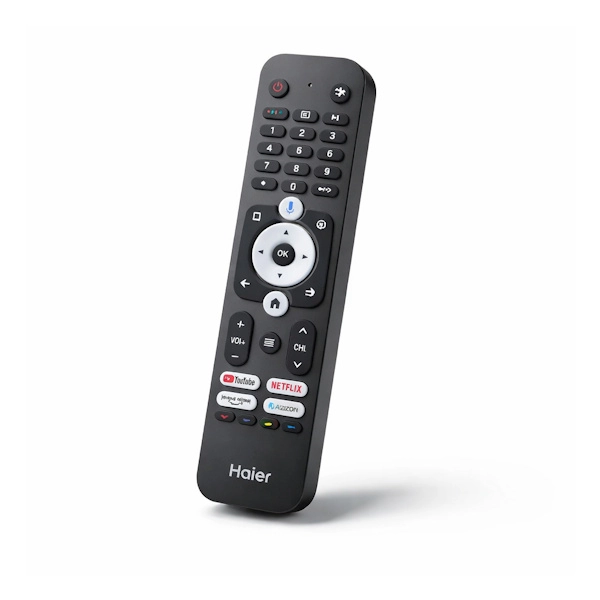
Original Haier remote control with Google Assistant voice control, direct Netflix and YouTube buttons, and Bluetooth connection
Compatible with 55S800 and 65S800 models
⚠️ Want perfect results?
For the remote to fit and give you the best performance, make sure it is compatible with your model.
Click the 'Check Model Compatibility' button above For a quick check of seconds.
Why is the original Air remote the right choice?
Is your old remote broken, not as responsive as it used to be, or just gone? We know it.
Original sign from the official importer Ensures perfect fit, full functionality of all smart functions, and long lifespan.
In our experience in official service laboratories, non-original remotes cause frequent compatibility issues:
Buttons that don't work, response delays, and unstable Bluetooth connection.
The original remote comes ready to use. – Just insert batteries and connect to the TV.
✅ Advantages of the original remote
- Built-in voice control – Say “OK Google” and search for content, control volume, or launch apps
- Quick access buttons – Netflix, YouTube, Prime Video and Xiaomi TV+ with one click
- Bluetooth connection – No need to aim at the TV, control from anywhere in the room
- Ergonomic design – Comfortable to hold for long periods of time, comfortably sized buttons
- perfect match – Designed specifically for the Google TV interface of Haier TVs
What does the sign include?
The original S800 series remote offers an advanced user experience:
Voice control with Google Assistant
Instead of typing, just press the microphone button and say what you want. You can search for movies, ask about the weather, or control smart home devices.
Dedicated app buttons
Direct access to Netflix, YouTube, Prime Video. No menu navigation.
Our certified technicians note that this is one of the favorite features of customers.
Intuitive navigation panel
Central navigation ring with OK button, back and home buttons for quick navigation in the Google TV interface.
📍 Where do you find the TV model number?
Before ordering a new remote control, it is important to verify compatibility:
- On the TV box – Sticker with the model number and barcode on the side of the packaging
- On the back of the TV – Sticker near the HDMI and USB connections
- In the TV settings – Settings > System > About
🔧 Simple installation in three steps
Step 1: Insert 2 AAA batteries (not included)
Step 2: Press and hold the red button + the blue minus button for 5 seconds near the TV
Step 3: The remote will automatically connect via Bluetooth – ready to use!
💡 Tip from the experts:
Use new alkaline batteries for optimal performance.
Customers who purchased this remote praised the connection speed and immediate response.
Technical
| attribute | Details |
|---|---|
| brand | Haier |
| Product type | Original remote control |
| compatibility | S800 Series TVs (55S800, 65S800) |
| Connection | Bluetooth + IR |
| Voice control | Google Assistant built-in |
| Quick access buttons | Netflix, YouTube, Prime Video |
| סוללות | 2 × AAA (not included) |
| התקנה | Plug & Play – no programming required |
| responsibility | Official importer warranty |
FAQ
Does the remote control fit my model?
The remote is compatible with Haier S800 series TVs, including the 55S800 and 65S800 models.
Click the “Check Model Compatibility” button at the top of the page. And the system will confirm the match immediately.
Is this an original product?
Yes. This is an original Haier remote control, identical to the one that came with the TV from the manufacturer.
We are the official importer and provide only original parts and accessories.
Does the remote need to be programmed?
No. The remote comes ready to use.
Simply insert batteries and perform a brief Bluetooth connection pairing – and the remote works.
What do you do if voice control doesn't work?
Make sure the remote is connected via Bluetooth and not just IR.
If the problem persists, try re-pairing as instructed above.
My old remote still works partially – should I replace it?
If some of the buttons are unresponsive or the response is slow, it is worth replacing.
A sign that starts to deteriorate will usually continue to deteriorate.