Description
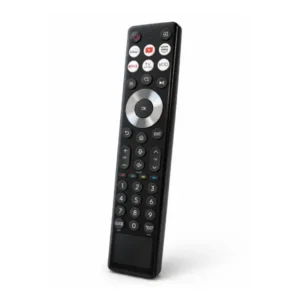
Original remote control for Hisense 75A69N Hisense TV with VIDAA and voice control
Original remote control for Hisense 75A69N TV.
Ensures perfect compatibility and direct access to Netflix, YouTube, Disney+ and Apple TV streaming apps.
The remote includes a built-in voice control button and supports the VIDAA U7.6 operating system,
And allows for a comfortable and complete user experience on your smart TV.
Want perfect results?
In order for the remote to fit and give you all the best functions,
Make sure it fits your model.
Click the 'Check Model Compatibility' button above For a quick check of seconds.
Lost or broken remote? No reason to give up convenience
Tired of getting up from the couch to change the channel? Has your old remote stopped responding?
You don't have to suffer anymore.
A new original remote puts full control back in your hands and allows access to all of the TV's smart functions.
From our experience in official service laboratories,
A non-original remote may cause compatibility issues. Like unresponsive buttons,
Lack of voice control support, or lack of direct access to apps.
The original remote is specially designed for the VIDAA operating system and ensures smooth operation with all features.
Why choose the original Hisense remote control?
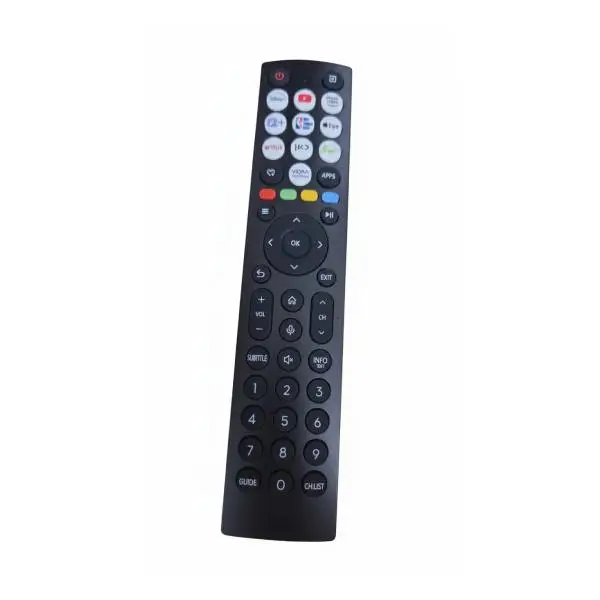
✅ Direct access to popular apps
The remote includes dedicated shortcut buttons for your favorite streaming apps:
- Netflix
- YouTube
- Disney +
- Prime Video
- Apple TV +
- Kan 11, Keshet 12, Reshet 13
- HOT, Cellcom TV, Free TV
✅ Advanced voice control
The built-in microphone button allows Search content by voice Without typing.
Just click, speak, and the TV finds what you're looking for.
✅ Full compatibility with the VIDAA U7.6 system
The remote is designed to work perfectly with Hisense's smart operating system,
Includes quick menu navigation, picture and sound settings, and game mode.
✅ Ergonomic and comfortable design
Lightweight, soft buttons with quick response, and a transmission range of up to 10 meters.
How to make sure the remote is suitable for your model?
🔍 Where is the model number on a Hisense TV?
You can find the model number in one of the following places:
- The back of the TV – White sticker at the bottom or center of the back
- Settings menu – Settings → Support → System Information → Version → Model
- TV packaging – If you kept the original box
- Purchase invoice – Product details usually appear on the receipt
⚠️ pay attention: The model number contains letters and numbers (for example: 75A69N).
Don't be confused with the serial number which contains 23 characters.
A tip from our technicians 💡
To extend the life of the remote:
- Replace high-quality AAA batteries every 6-12 months.
- Store in a dry place, away from direct sunlight.
- Clean the surface of the remote control with a dry cloth from time to time.
- Avoid falls and exposure to liquids.
Customers who purchased this sign praised the ease of installation and the fact that the sign comes ready to use.
Just insert batteries and start zapping!
Technical
| attribute |
Details |
| brand |
Hisense |
| Product type |
Original remote control |
| Model Compatibility |
75A69N |
| Series compatibility |
A69N Series (43A69N, 50A69N, 55A69N, 58A69N, 65A69N, 75A69N, 85A69N) |
| Operating System |
LIFE U7.6 |
| Voice control |
Yes (Bluetooth) |
| Streaming buttons |
Netflix, YouTube, Disney+, Prime Video, Apple TV+, VIDAA |
| Transmission range |
Up to 10 meters |
| Battery type |
2 × AAA (not included) |
| צבע |
black |
| התקנה |
No coding – ready to use immediately |
| responsibility |
Official importer warranty |
Frequently Asked Questions (FAQ)
❓ Is the remote compatible with my TV model?
Answer: Click on 'Check Model Compatibility' button At the top of the page,
Enter the model number from the back of the TV, and the system will immediately confirm the match.
❓ Do I need to encode or match?
Answer: No! The original remote comes ready to use. Simply insert 2 AAA batteries and the remote will work immediately.
For the voice control function, a one-time Bluetooth pairing must be performed via the settings menu.
❓ Is this an original or replacement remote?
Answer: This Original Hisense remote control – Not a replacement part or an unapproved product.
The remote is manufactured by Hisense and comes through the official importer with a full warranty.
❓ What to do if the remote is not responding?
Answer: First, check that the batteries are in good condition and inserted in the correct direction.
Try replacing with new batteries. If the problem persists, unplug the TV for 30 seconds and then plug it back in.
❓ Does the remote support all Israeli apps?
Answer: Yes!
The VIDAA U7.6 system supports Israeli applications such as Kan 11, Keshet 12, Reshet 13, HOT, Cellcom TV, Free TV and more.
This is one of the most sought-after replacement accessories due to its quality and perfect compatibility with Hisense TVs. Fast shipping nationwide.


 Marom Service The official service company for Kitchen & Home Appliances from Sharp, Bloomberg, Haier, Zanussi, Auchent, DeLonghi, Magimix, KitchenAid and Tefal